Customer and delivery
Fix the name, phone, address and Country. Change the Delivery Company if needed.
 All guides
Open any order to correct it. Every change updates its real profit at once.
Fix the name, phone, address and Country. Change the Delivery Company if needed.
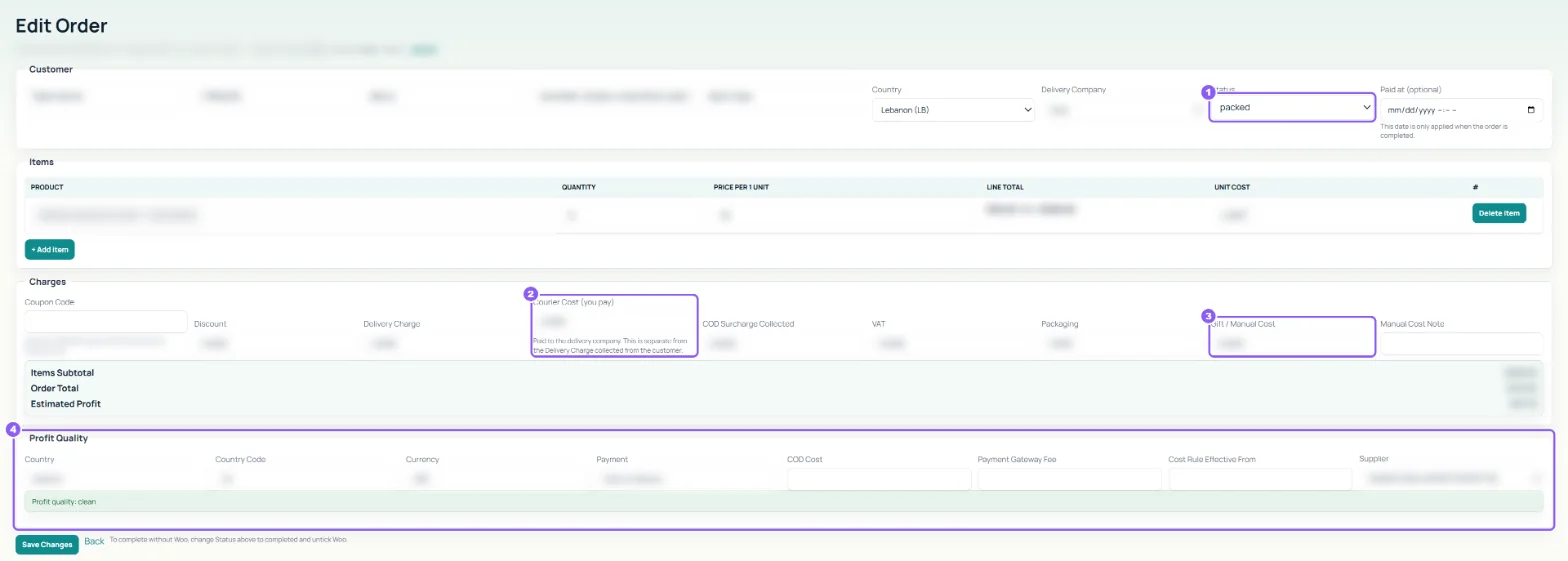
Pick the new Status. Tick Update Woo too when status changes to change your website order as well. Set Completed at when the money arrived on another day.
Change quantity, price or Unit Cost, click + Add item to add one, or Delete item to remove one.
Delivery Charge is what the customer paid for delivery. Courier Cost (you pay) is what the delivery company charges you; keep them separate. Also COD Surcharge Collected, VAT, Packaging, and Gift / Manual Cost with a Manual Cost Note for anything extra.
Shows how the costs were found: Country, Currency, Payment, COD Cost, Payment Gateway Fee, the Cost Rule Effective From date and the Supplier. Change the supplier if the wrong one was picked.
Click Save Changes. If the status changed, Ecom may ask Update platform status?: Yes changes your website too, No only here.