Create the user
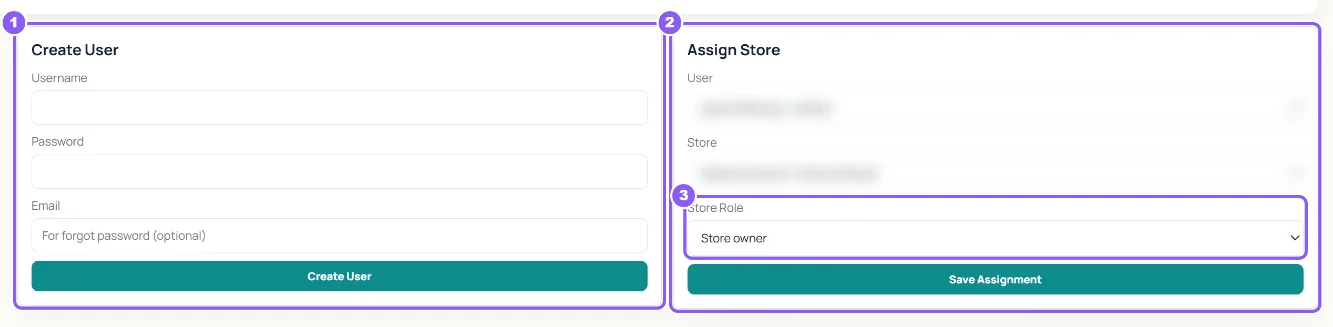
In Create User type a Username, a Password and an Email (used for forgot password), then click Create User. Share the sign-in privately.
 All guides
Each person should have their own user. Roles decide what they see: packers see only Orders and Packing, store owners see everything.
In Create User type a Username, a Password and an Email (used for forgot password), then click Create User. Share the sign-in privately.
In Assign Store choose the user, the store and the Store Role: Store owner (everything, including Settings and Admin) or Staff. Click Save Assignment. You can also tick access for many users at once in the Access Matrix and click Save Assignments.
In Users click Manage next to the user. Use Reset password to set a new one, or Email & reset link → Save & send reset email so they choose it themselves.
In Create Store type the Store Name, pick the Platform and Timezone and click Create Store. Then connect it in Settings. A Store menu appears in the top bar to switch between stores.
Supplier Profiles lists who you buy from: name, type (Web or Physical), countries, default cost and shipping, delivery time and Currency. Click Create Supplier, then Save Supplier Profile to add details. Suppliers are used in cost rules and purchase invoices.
Some roles can only be set by CapiTracker support. Create the user as a store user, then ask support to switch the role.
No. Packing users never see Monthly Profit, costs or the app's Profit tab.