Read the cards
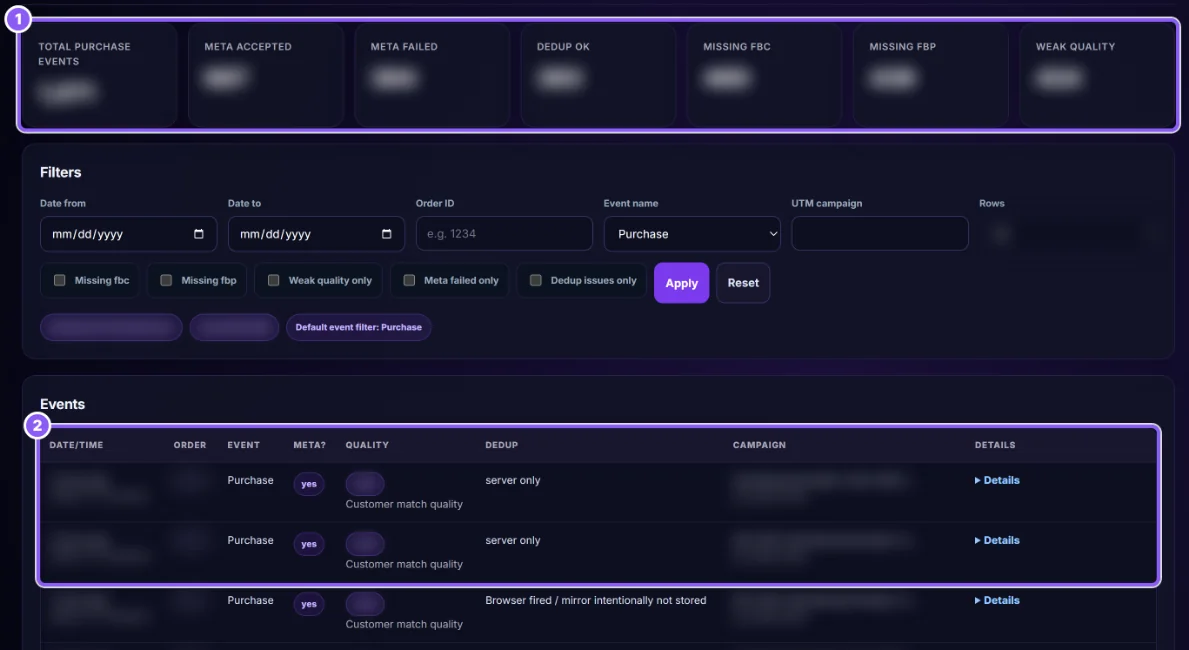
The cards at the top (1) count the purchases in your filter: how many Meta accepted or refused, how many were counted once correctly, and how many miss a click ID or have weak data.
 All guides
Meta matches a purchase to a person better when it gets more details (email, phone, click ID). This page scores each purchase and shows what is missing.
The cards at the top (1) count the purchases in your filter: how many Meta accepted or refused, how many were counted once correctly, and how many miss a click ID or have weak data.
Set Date from / Date to, an Order ID, an Event name (Purchase by default) or a UTM campaign. Tick Missing fbc, Missing fbp, Weak quality only, Meta failed only or Dedup issues only to see only the problems. Click Apply.

Each row (2) is one event: Date/time, Order, Event, Meta? (accepted or not), Quality, Dedup, Campaign. The order number opens the order in WooCommerce.
Click Details on a row. You see the Warnings, which details were sent (Signal Presence), Meta's answer (Delivery Summary) and where the click came from (Attribution Evidence Summary). Personal details are not shown in full.
Ask for email and phone at checkout, keep the CapiTracker URL parameters on your ads (guide), and do not block cookies before the visitor accepts them.
The token expired or was removed. Make a new one and paste it in Settings → Ads: Meta credentials.