Run the report
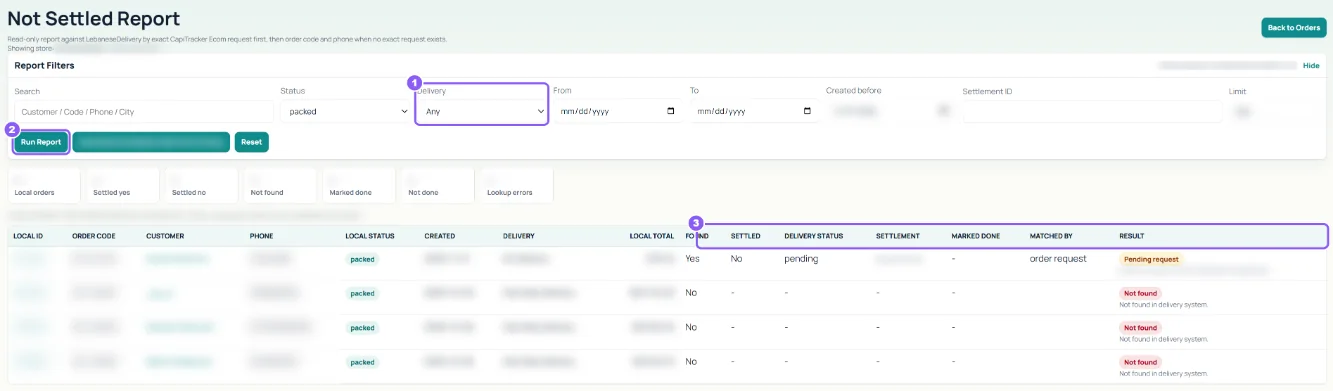
Open Report Filters. It starts with packed orders older than your Settings days. Pick a Delivery company, dates, Created before or a Settlement ID, then click Run Report.
 All guides
With cash on delivery, the courier collects the money and pays you later. The Not Settled Report lists packed orders that are still not completed after some days, so you can check them with the courier.
Open Report Filters. It starts with packed orders older than your Settings days. Pick a Delivery company, dates, Created before or a Settlement ID, then click Run Report.
For each order you see its Local Status, Local Total, whether the delivery company record was Found, whether it is Settled, the courier's Delivery Status and the Result.
When the courier pays you, open Delivery Settlements (it has no menu link yet: go to ecom.capitracker.com/?r=delivery_settlements). Filter by Delivery Company and dates, tick the orders paid, and for each set the final status (completed, cancelled or returned), Received, Delivery Fee, COD Fee and any Adjustment. Fill Settlement Date, Received At and a Reference, then click Close Settlement Batch.